Essential Features of Modern Medical Billing Software
Medical billing is the core of the daily administrative work of all medical institutions, supporting the normal operation of the institution. If billing is inaccurate and full of errors and omissions, it will be extremely difficult for a clinic or medical institution to track payments and maintain stable financial records. Traditional billing methods trap teams in endless paperwork, manual calculations, and repeated data entry, wasting a great deal of precious time for medical staff. Modern medical billing software integrates these scattered tasks into a smooth digital workflow, eliminating the need to juggle between disconnected spreadsheets and paper documents. Staff can store patient information, service records, expense details, invoices, and all payment collection information in the same unified system. Well-suited billing software can lift the administrative burden weighing on many medical staff. This is why it is critical to spend time carefully verifying its core essential functions before finalizing a modern medical billing system.
Understanding Modern Medical Billing Software
Modern medical billing software is a digital tool specifically built for medical institutions to handle all billing-related work used in the institution's daily operations. It comes with various tools to centrally manage patient information, service details, billing records, invoices, payment records, and medical insurance claims, all stored in one place. Staff can directly enter and update billing information in this centralized system, eliminating the need to copy data across different tools. The software organizes all stored data in a unified, easy-to-search format, so anyone on the team can find the content they need in seconds.
Patient Billing Information
Accurate patient information is a non-negotiable foundational requirement for reliable medical billing. Modern billing software creates profiles for patients, storing all key billing-related information in one location, so staff never have to search for scattered records again. Teams can store patients' names, contact information, medical insurance plan details, service records, billing history, and payment records in dedicated standardized fields, preventing confusion at the source. Centralized storage of this information eliminates the hassle of repeated data entry, removing the need to input the same group of patients' information repeatedly across different forms or tools. When processing billing work, all relevant patient records are immediately accessible, making every step of the process smoother.
Centralized Patient Profiles

The patient profiles maintained by modern billing software organize all billing details in a unified, clear format accessible to all team members. Staff can store patients' names, contact information, medical insurance details, service records, billing records, and payment histories in purpose-built fields, keeping data neat and orderly long-term. Centralized storage of all information makes patient records easier to access and update, so no one wastes time searching for outdated, scattered files. This setup ensures all relevant patient information is always available to support daily billing work, preventing unnecessary delays when the team processes pending tasks.
Accurate Billing Information
Well-organized patient information reduces repeated data entry that consumes staff time and causes avoidable errors. When processing billing work, all relevant patient records are just a few clicks away, so staff can move through tasks quickly. Continuous updates to all information also reduce the likelihood of billing errors, mistakes that often stem from incorrect fee entries or missing key information, which disrupt payment timelines. Reliable, accurate records make the entire billing process far more stable, allowing medical institutions to count on steady, timely revenue.
Easy Access to Account History
More robust patient information management provides a solid foundation for an efficient billing process. Medical insurance claims are an indispensable, critical part of the medical billing process; to manage billing well, you must first get claims processes in order. Today's billing software can help you handle the entire process, from preparing claim materials and organizing all types of information to following up on overall progress. Staff no longer have to sift through piles of paper forms; all required patient information and service details can be entered step-by-step in the online claims workflow, and anything you need can be accessed at any time.
Essential Billing Functions
Today's medical billing software comes with a wide range of features, many of which seem useful on the surface, but more features do not necessarily mean it is the right fit for you. The core purpose of all features is to help you organize the trivial daily billing tasks, so you do not spend the entire day rushing around only to make mistakes. When a clinic selects software, do not just check items off a feature list; you must first clarify your actual billing needs, then compare them against the 8 core functions listed below. Only a system that meets your needs is useful. Patient Account Management: Can store all basic patient information, all services the patient has received at the clinic, fees generated from each visit, all payments made, and the full historical record of the account since its creation, all in the same structured electronic file, eliminating the need to create separate folders or store scattered spreadsheets for each patient.
Medical Insurance Information Management:
Helps staff organize each patient's medical insurance information in an orderly manner. If a patient's insurance expires or their reimbursement rate changes, the information can be updated at any time and stored directly with the patient's billing records, so staff do not have to search through separate insurance files when checking billing details.

Claims Tracking:
Continuously monitors claims that have been submitted to insurance providers and those still being prepared for submission, so staff do not have to remember which claims need follow-up. By following the claims progress in the system, they can keep up with the pace of the billing process and never miss a payment that is owed.
Invoice Generation:
Eliminates the need to format invoices manually in Word; the system can directly organize a patient's service content and corresponding fees into a standard, compliant invoice format that can be printed or sent to the patient.
Does Billing Software Provide Payment Tracking:
Helps the clinic's administrative staff organize all received payments and outstanding balances clearly. For any patient, you can see how much they still owe by opening the system, and you can also view all account change records, so there are no discrepancies in accounts.
Billing Reports:
Eliminates the need for managers to calculate totals manually from piles of transaction records; the system's generated reports clearly present the clinic's revenue, received payments, all in-process claims, and remaining outstanding balances, so you do not have to add up numbers manually.
Automated Reminders:
Eliminates the need for staff to call each patient with unpaid fees to remind them; the system's built-in function sends reminders automatically. Whether it is reminding patients of outstanding balances or handling other billing-related communications, the system sends alerts at the set time, so nothing is forgotten.
Automated Billing Workflows
Automation is one of the most core features of modern medical billing software and the function that saves staff the most effort. The repetitive trivial tasks involved in daily billing, such as generating invoices and sending reminders, can all be handled by automated workflows, eliminating the need for staff to operate manually for every small task, which is time-consuming and error-prone. The system can automatically generate compliant invoices based on the entered patient information and service content; it can automatically send payment reminders to patients with outstanding balances at pre-set times; even claims status updates can be tracked in real time in the system, so you do not have to refresh the insurance platform every day to check progress.

Features to Improve Billing Oversight
All the tools built into medical billing software are designed at their core to help clinics gain a clearer grasp of all billing links, so you never lose track of how much money has been collected and how much is still outstanding. These features are particularly useful for monitoring and organizing daily billing work, helping you keep the entire process under control:
Does Billing Software Provide Payment Tracking
Payment tracking tools organize all received and pending payments clearly, so you do not have to reconcile each transaction manually against bank statements. Staff can simply open the corresponding patient account to check how much is still outstanding and follow up on payment collection in an orderly manner, never missing a reminder for one patient or another. Accurate payment records also help organize the entire clinic's financial accounts, so when it is time to conduct an inventory at the end of the month or year, you do not have to reconcile accounts against piles of scattered receipts.
Claims Monitoring
Claims monitoring helps staff check the current status of every claim at any time. They can quickly find which claims are still waiting for insurance review and which have been returned due to incomplete materials, without sifting through chat logs or personal notebooks. Staff can schedule follow-up work in advance, submit missing materials where needed, or follow up on approvals so the progress of the entire billing process is clear and you never get stuck on a claim without knowing what went wrong.
Financial Reports
Financial reports organize all billing activities over a period of time into a clear overview, eliminating the need for managers to compile statistics manually. You can check received payments, the total fees generated by all patients, outstanding balances, and information related to every claim in the report. You can even identify patterns in the workflow from the report, for example, that there is always a peak in claims submission on certain days of each month or that a certain link frequently hits snags. With this concrete information, you can make more reasonable administrative decisions, instead of adjusting workflows based on intuition.
Easily Manage Payment Collection
Medical billing software organizes the entire payment collection process clearly, eliminating the frustrations of lost paper receipts or incorrectly recorded accounts. Staff only need to accurately record every payment received in the corresponding patient's account, and they can immediately see how much is still owed by opening the patient's page in the system without having to flip through notebooks or ask other staff. far more convenient than modifying paper documents.
Medical Insurance and Eligibility Verification Information
Medical insurance information directly impacts the entire medical billing process, and many billing errors and rejected claims are caused by incorrect insurance information. Today's billing software stores a patient's medical insurance information with their billing profile, so if staff need to check a patient's insurance details, they can view it on the patient's page in the system without searching through separate insurance files. Accurate insurance information also reduces the risk of billing errors, so you do not find out the information was wrong only after a claim is rejected. The specific availability and details of this feature vary by software developer, so be sure to ask about it before purchasing.
Make More Informed Decisions with Reports
The core purpose of the reporting tool in medical billing software is to help the clinic's managers understand the clinic's overall financial situation, so they are not confused by piles of scattered transaction records. It becomes easier for the entire team to track billing progress, and managers can use this concrete information to find ways to optimize the clinic's billing process, instead of making rule changes based on intuition. Reports also make all work more transparent: who is responsible for which link and what the progress is can be seen in the report, so managers can better oversee all billing work and never face a problem where no one is held accountable when an issue arises.
Features for Overall Clinic Management
Medical billing software is not just for managing money and finances; it can also help manage the entire clinic's operations, providing support for administration, staffing, and workflows. Several features are particularly useful for clinic managers:
Custom Reports
Not all clinics have the same needs, and custom reports can generate billing information tailored to your clinic's specific requirements. Managers can filter the data they need by category or time period—for example, if you only want to view this month's pediatric billing data or only the second half of the year's claims data, you can pull up the corresponding report for more targeted analysis. You do not have to search for the content you need in a large set of clinic-wide general data, making it easier to create the clinic's operation plan without having to organize data and create spreadsheets manually.
User Permissions
The user permissions tool helps set different system access rights for staff in different positions. For example, billing staff can view the billing information of the patients they are responsible for, front desk staff can only schedule appointments and cannot access financial data, and only authorized personnel can view sensitive billing information. This better protects patients' private information and the clinic's financial data from leaks. Reasonable permission settings are an important part of a secure work process; never grant full system access to all staff casually, as this can lead to problems.
Integration with Other Medical Systems
Many of today's medical billing software programs can connect to other medical systems your clinic is already using. Which systems can be connected to, and whether a connection is possible, depends on the software's development platform, as not all software supports arbitrary integration. If it can integrate with EHR or EMR systems, information such as patients' medical records and received services can be directly linked into the billing process, so staff do not have to copy information from the medical record system and re-enter it into the billing system, which saves a great deal of repetitive work. Integrating with the clinic's appointment system can also advance billing-related work. When a patient books an appointment, the system can prepare the information required for billing ahead of time, so the patient can check out immediately after their appointment. Integrating with a payment system also makes it easy to manage all of a patient's payment transactions: payments made via WeChat, Alipay, and credit card are all unified in the system, so you do not have to reconcile accounts separately.
Security and Access Control
Medical billing records store a large amount of patients' private information and the clinic's financially sensitive content, so security is absolutely a core feature that the software must have. Never use software without security features, no matter how cheap it is. Today's legitimate billing software all offer identity verification and access permission settings, which can grant different access rights to staff in different positions so only authorized personnel can view the corresponding sensitive information. No random staff member can view all of the clinic's financial data. Some systems also come with audit features, so the institution can track who logged into the system and what operations they performed at any time, and the person responsible can be identified immediately if a problem occurs.
Choose the Right Billing Software for Your Clinic
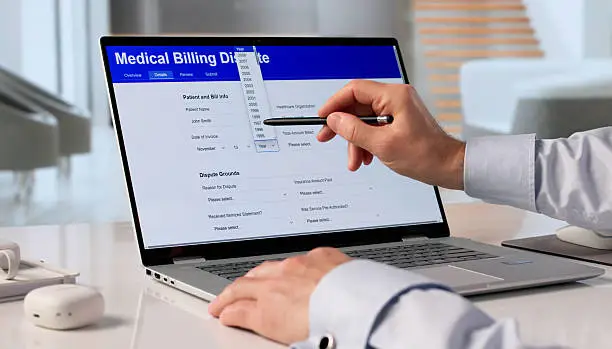
Every medical institution has a different scale, patient base, and billing process, so their billing needs are equally diverse. This is why, when selecting software, you must never buy it on impulse just because it lists a long string of features; many of those features you may never use, and you will have wasted money. The system you choose must be easy to use, so staff do not find it difficult to operate. If it is too complex and staff cannot learn to use it, even the best features are useless. The core features you need, such as claims management, payment tracking, report generation, and patient account management, must be complete; you cannot lack the core functions used every day.
Choose Easy-to-Use Platforms
If the software is too complex to operate, and staff have to spend a long time learning it, or even feel uncomfortable using it and refuse to adopt it, the best features can't play to their function. Choose an easy-to-use system that the team can adopt quickly, so it does not add a burden to daily work.
Test Compatibility with Existing Systems
If your clinic is already using other medical management tools, you must first test whether this billing software can connect to your existing systems. If it cannot, staff will have to enter the same information back and forth across multiple systems, which creates more hassle than before.
Conclusion
Modern Medical Billing Software streamlines the daily financial and administrative work of medical institutions. Core capabilities, including patient account management, claims tracking, payment management, invoice creation, report generation, medical insurance information management, automation, and security protection, support the stable, accurate operation of daily billing business. All records are stored in the same system, so team members can pull up the information they need in seconds, never again delayed by information scattered across multiple locations. Automated workflows eliminate repetitive manual operations and repeated manual data entry—precisely the actions most likely to cause serious errors. The team must systematically test the platform's usability, core features, security standards, integration options, service quality, pricing, and ability to meet future needs before finalizing it. You must also provide comprehensive training for all staff to ensure everyone can use the system's full features, preventing improper operation. Choosing the right medical billing solution helps medical institutions manage billing more efficiently, reduce administrative workload, and maintain clear, reliable financial records.
FAQ
What is Medical Billing Software?
It is a digital tool designed specifically for medical institutions to help the organization manage patient billing, claims, payment collection, invoices, and other core financial work.
What are the main features of modern medical billing software?
Main features can include patient account management, claims tracking, payment management, invoice tools, report generation, medical insurance information management, automation, system integration, and security controls.
Does Medical Billing Software Manage Claims?
Yes, many billing systems offer tools to prepare, organize, submit, and track claims, with specific features depending on the software provider.
Does Billing Software Provide Payment Tracking?
Yes, modern systems help you organize received payments, outstanding balances, and transaction records, all linked to the corresponding patient account.
Can Medical Billing Software Reduce Errors?
Digital forms, verification tools, automatic calculations, and centrally stored information all reduce the likelihood of manual billing errors, but staff reviews are still essential.
Can Billing Software Integrate with EHR?
Some medical billing systems support integration with EHR or EMR platforms, and which integration options are available depends on the software itself and the clinic's existing configuration.
Why are security features important in billing software?
Billing systems manage patient and financial information and user permissions; secure login, access control, and other security features help protect this sensitive information from leaks.