A Simple Guide to Choosing EMR Medical Systems
Choosing the right Electronic Medical Record (EMR) system is a critical decision for any healthcare organization. After all, this system will be embedded into every link of your daily operations, and the quality of your choice will directly impact the work efficiency of medical staff, patients, and the entire organization. A suitable system enables better management of patient information, streamlines clinical workflows, reduces redundant administrative tasks, and facilitates smoother communication among healthcare providers. A system built for large hospitals will be overly complex for small clinics—a community clinic that only treats common general practice conditions has no use for features required by top-tier tertiary hospitals, such as multi-department coordination and ICU bed management. Forcing staff to use such a system would only force them to click dozens of useless buttons every day. Conversely, some low-cost systems cannot meet the integration, security control, reporting tools, or scalability needs of growing healthcare organizations. By the time you open a branch clinic and your patient volume triples, you will find the system cannot keep up, and the cost of switching will only be higher.
What Is an EMR Medical System?
An electronic medical record system is a tool used by healthcare organizations to digitally create, store, manage, and retrieve patient medical information. Put simply, it is a set of software that moves all patient information previously recorded on paper charts, logbooks, and prescription slips onto computers or even mobile devices, eliminating the need to sift through piles of physical documents to find information. Core functions included across different platforms may vary—each provider adds or removes features based on their positioning, and you do not need every single one:
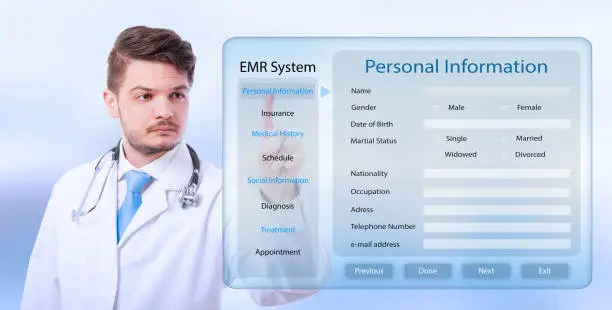
Basic patient information
Medical history
Confirmed diagnoses
Clinical notes
Medications
Allergies
Lab results
Imaging data
Treatment plans
Appointment information
Payment records
Prescriptions
Why Choosing the Right EMR Is Critical
An EMR becomes part of the daily work environment for doctors, nurses, administrative staff, and all other healthcare workers. Just like the office computer you use every day or the examination chair you sit in, it is an indispensable tool. If the tool does not work well, your entire workday will be disrupted. Choosing the wrong system triggers a cascade of problems, each of which will disrupt your daily operations, including:
Complicated workflows
Excessive data entry requirements
System lag
Inability to locate needed features
Inability to integrate with other systems
Inability to generate required reports
Staff frustration
Higher long-term costs to patch gaps
Complex, error-prone data migration when you eventually switch systems
A correctly chosen system streamlines workflows, organizes all patient information for easy access, and fits your team’s needs to speed up daily work. A suitable EMR must help your team complete daily tasks efficiently, without adding unnecessary steps to their workload—if writing a prescription originally took 3 clicks, but the new system requires 10, it is creating problems, not solving them.
Understand Your Healthcare Organization's Needs
Before comparing different EMR vendors, take time to clarify what your organization needs this tool to achieve. This is the first and most foundational step of the entire selection process. If you do not understand your own requirements, you will be led astray by any vendor’s marketing materials you encounter. Ask yourself these core questions, and write down the answers one by one—do not rely on memory alone. Organizing your requirements into a structured EMR Requirements Checklist lets you compare vendors objectively, without being distracted by flashy, never-used marketing features—many vendors overhype niche advanced functions that you will never actually need, leading you to waste money.
Create an EMR Requirements Checklist
Sort your needs into clear categories to keep your evaluation focused so you do not miss critical requirements or get distracted by irrelevant features. You can use this classification framework directly, and adjust it to your own circumstances:
Category
Examples
Clinical
Write medical records, log confirmed diagnoses, create treatment plans
Administrative
Schedule appointments, complete registrations, process payments
Medication
Electronic prescribing and recording medication history
Diagnostic
Integrate with laboratory and imaging systems
Communication
Internal medical team collaboration
Reporting
Generate clinical and operational reports
Security
Identity verification, access permission control, activity logging
Integration
API and information exchange
Patient Engagement
Patient portal and messaging features
Support
Training and technical assistance
This organized approach prevents your organization from blindly choosing a system just because its interface looks modern and attractive—an appealing interface is useless if the system cannot function for your core needs.
Step 2: Analyze Your Existing Healthcare Workflow
Before finalizing any EMR, map out how clinical work currently flows within your organization. Do not jump straight to reviewing new systems; if you do not fully understand how you currently complete your work, you will not know what problems the new system needs to solve. Walk through the entire process of a patient from arrival to departure.
Decide Which EMR Features You Actually Need
Not every healthcare organization needs every feature offered by top-tier EMR platforms. More features do not equal a better fit, and a common mistake when selecting systems is assuming that more functionality is always better—only for most features to go unused, while you still pay for them. Small primary care clinics may only need these core features, with any additional functionality being an unnecessary burden: Patient registration, appointment scheduling, writing clinical notes, electronic prescribing, processing payments, and communicating with patients. Large hospitals require far more features, as the range of conditions they treat and the complexity of their workflows operate on an entirely different scale. They need support for emergency department workflows, inpatient records, surgery management, laboratory system integration, imaging system integration, pharmacy system integration, nurse charting, discharge management, advanced reporting, and integration with multiple departmental systems. The right system is one that meets every requirement on your needs list without adding a pile of complex features your team will never use—what fits your organization is the best option.
Evaluate EMR Ease of Use
Look for systems that meet these criteria, and test every single one in person during a live EMR demonstration—do not take a vendor’s word for it:
Clear navigation
Simple patient search
Convenient medical record creation
Logical menu structure
One-click access to frequently used features
Customizable workflows
Mobile accessibility if needed
Request a Live EMR Demonstration from the Vendor
Never make a decision based solely on screenshots or marketing materials—these are carefully edited "concept visuals" created by vendors, not the real-world scenarios you will encounter when using the system. Ask vendors to demonstrate the actual production system that all their clients use, not a custom-built demo version. Many vendors create optimized demo builds that bear little resemblance to the software clients actually use. During the demonstration, have them walk through common workflows instead of only showing off their most appealing features. Proactively ask them to follow the processes you use every day. The first scenario to test is patient registration, one of the most frequently used daily workflows. Ask the vendor to demonstrate these actions:
Create a new patient’s record.
Search for an existing patient.
Identify potential duplicate records.
Update a patient’s basic information.
Next, test the consultation process, the core daily task for physicians. Have them demonstrate these actions:
Open a patient’s medical record
Review medical history
Document the consultation
Add confirmed diagnoses
Create a treatment plan
Write a prescription
Schedule a follow-up appointment
An in-person demonstration reveals usability issues that never appear in product brochures. Many small pitfalls only become apparent after hands-on use, and it will be too late to fix them once you have signed a contract.
Evaluate EMR Interoperability
Healthcare organizations rarely operate independently; nearly all need to exchange information with external entities. Few clinics or hospitals can complete all care entirely without outside partners, and you may need to share data with the following:
How long does a typical integration take to complete?
A system with strong interoperability makes it easier to connect different parts of your care environment, eliminating the need to manually copy lab results into patient records—saving time and reducing the risk of errors.
User identity verification
Role-based access permissions
Data encryption
Activity logs
Secure backups
Access monitoring
Session controls
Data recovery procedures
Security updates
Also ask vendors how security responsibilities are divided between your organization and theirs, so you do not end up in a situation where both parties shift blame after a security incident.
What security assessments or certifications does the system hold?
Security requirements vary by country and healthcare setting, so your organization must also evaluate compliance with applicable local privacy and data protection laws. For example, in China, organizations must meet the requirements of the Personal Information Protection Law and the Measures for the Administration of Network Security in Medical and Health Institutions; failure to comply can result in penalties from regulatory authorities.
Check EMR Certification Requirements
If the region where your organization operates requires health information technology systems to hold certification, first clarify which certifications you need to meet. Do not select an uncertified system that will fail regulatory inspections, forcing you to switch later and incur major losses.
Evaluate Patient Engagement Features
In modern healthcare, more and more patients use digital systems to interact with care organizations. No one likes waiting on hold to book an appointment; everyone prefers to schedule care with a few taps on their phone. These patient-facing features save your administrative team significant time and effort. Depending on your organization’s needs, these patient-facing features may be useful, and you can select those that fit your requirements rather than adopting all of them:
Online appointment booking
Patient portal
Secure messaging
Access to health information
View lab results
View prescription information
Complete electronic forms
Receive appointment reminders
Evaluate Laboratory and Diagnostic Integration
If your organization regularly orders lab tests or other diagnostic screenings, the ability to integrate with these systems is extremely valuable. It eliminates the need to manually copy lab results into patient records, where even a single mistyped number can create serious problems. Ask if the EMR can perform these core functions required for laboratory integration; if it cannot, manual data entry may be the better option:
Electronic test ordering
Receive test results
Match results to the correct patient
Notify relevant staff
Track pending tests
Support subsequent follow-up workflows
Integrating the laboratory process into your EMR reduces manual data entry workload and lets authorized physicians access results at any time, eliminating the need to call labs to request results and saving significant communication time.
EMR Reporting and Analytics
Healthcare organizations rely on data to understand their operations. You cannot run your practice blindly; you need to easily access data on monthly patient volume, revenue, most popular services, and other metrics to make operational decisions. Ideally, your EMR provides reporting tools that meet your organization’s needs, eliminating the need to manually calculate data in Excel, which wastes valuable time. Reports you may use include these, which you can select based on your needs:
Patient volume
Appointment status
Clinical services provided
Medications
Laboratory usage
Payment records
Quality metrics
Operational efficiency
Staff productivity
Patient flow
Ask if reports can be customized, and confirm that data can be exported for analysis by relevant staff. Every organization has unique needs, so generic reports may not meet your requirements, and customizability is ideal.
Consider Cloud-Based vs. On-Premises EMR

A key decision is how your EMR will be deployed—where the system will run, whether on your organization’s own servers or the vendor’s cloud servers. The two models have major differences, so you must select the one that fits your circumstances.
Cloud-Based EMR
Cloud-deployed systems are hosted and managed by the vendor or their infrastructure provider. You do not need to purchase your own servers; you only need an internet connection to access the system.
On-Premises EMR
On-premises systems run on servers managed by your organization, with all data stored on your own servers so you retain full control.
Potential benefits, the core advantages of on-premises deployment, include the following:
Direct control over all infrastructure
Ability to customize infrastructure details
Challenges to address: The pressures that come with on-premises deployment include
Upfront hardware costs
In-house maintenance responsibility
Need for dedicated IT staff
Internal management of backups and security
Responsibility for system upgrades
Which option is better depends on your organization’s technical capacity, budget, security requirements, and operational needs. There is no universal "good" or "bad" choice, only what fits your organization. Small clinics without an in-house IT team will find cloud deployment far simpler, while large hospitals with the technical capacity to manage on-premises systems gain more control with that model.
Calculate the Total Cost of Ownership
Never evaluate an EMR based solely on the subscription price listed in a vendor’s advertisements. Many vendors set a low initial subscription fee, then add various extra charges that end up making the system more expensive overall. You must account for all costs to avoid falling into the low-price trap.
Calculate all expenses, tallying every cost from purchasing the system through its first three to five years of use, rather than only looking at first-year spending.
Contract cancellation penalties
A low upfront price does not guarantee low long-term costs. Many seemingly cheap systems end up costing more than higher-priced alternatives once all miscellaneous fees are added up. Always calculate the total cost of ownership.
Review the EMR vendor's customer support.
Technical support is extremely important. Purchasing an EMR is not the end of your relationship with the vendor; you will inevitably encounter issues during use, from system login failures to feature bugs, that require vendor support to resolve. If support is unreliable, your daily operations will grind to a halt. Any EMR issue disrupts the entire care workflow. For example, if the system cannot be accessed during the morning consultation rush, all appointment booking and patient care will be disrupted, causing chaos. For this reason, the vendor’s ability to provide timely support is critical. Ask these questions, and write down every answer to assess the reliability of their support:
Ask About EMR Downtime and Contingency Planning
No technology system can avoid occasional outages. Even the most mature platforms may experience server failures or network fluctuations, so you must prepare in advance to avoid panic when the system goes down. Healthcare organizations must have a plan to handle periods when the EMR is unavailable. You cannot stop treating patients during those hours, so you need contingency plans to keep consultations running.
Evaluate EMR Data Migration
If you are replacing an existing EMR, data migration the process of moving patient information from your old system to the new one- is a major priority. Poor data migration that loses patient medical history or allergies can lead to medical errors. Your organization will need to transfer these core records, all of which must be moved in full without data loss:
Basic patient information
Medical history
Confirmed diagnoses
Medications
Allergies
Lab results
Clinical notes
All related documents
Previous visit records
Ask vendors these questions to clarify the data migration process long before you sign a contract, so you do not discover your old data cannot be transferred after committing:
Check EMR Scalability
Your EMR must support your organization’s future growth. You will not run a single small clinic forever; if your practice expands, you open a branch, and your patient volume multiplies, an undersized system will not keep up, forcing you to pay for a full system replacement, which is a huge waste. If your clinic or hospital grows in size, you may add these common elements as your organization expands:
Consider EMR customization.
Every healthcare organization has unique workflows, and no single system can adapt to every organization’s processes. For this reason, the ability to customize system workflows and templates to fit your work style is critical.
Some EMRs allow organizations to customize these common elements, the most frequently adjusted features:

Templates
Forms
Dashboard homepages
User roles
Alert content
Medical record creation workflows
Reports
Clinical data entry fields
Customization is useful, but excessive changes increase the system’s complexity and costs. More is not better; overcustomization can prevent future system upgrades and introduce bugs. The goal of customization should be to meet your core needs, not modify every part of the system. It only needs to streamline your core workflows; overcustomization creates unnecessary problems.
Test the EMR with real users.
Physicians and administrative staff must participate in the evaluation process. Do not let only owners or IT teams select the system; the people who use the system every day are the only ones who know which features work and which are unnecessary. Assemble a small evaluation team that includes staff from all roles, as each position has unique needs that must be tested. Examples include:
Physicians
Nurses
Front desk receptionists
Billing staff
Clinic managers
IT department representatives
Every person evaluates the system from their own perspective, revealing issues that technical staff alone might miss. An IT team may find the system runs smoothly, but a doctor who writes medical records every day may find data entry overly cumbersome. Only testing by actual end users can uncover all potential pitfalls.
EMR Vendor Comparison Scoring Sheet
A scoring system makes your final decision more objective, so you do not choose a system based on intuition. Quantify all evaluation dimensions, and the strengths and weaknesses of each option will be immediately clear. You can use this scoring framework: list the dimensions you value most, assign a weight to each (more important criteria get higher weights), then score the vendors you are considering. Score each vendor in every category, calculate the weighted total score, and consider the icons. The highest-scoring option is the best fit for your organization. This makes it easy to compare systems based on your true priorities, avoiding distraction from marketing campaigns. You will not pick a system just because a vendor recommends it; you will have your own objective evaluation criteria.
Common Mistakes When Choosing an EMR
These are pitfalls other organizations have encountered, which you must avoid. Many healthcare organizations make these mistakes during system selection, only to end up organization's priorities, and they uniformly evaluate each vendor’s ease of use, clinical features, security, interoperability, cost, support, scalability, and other important factors.
Conclusion
Choosing an EMR medical system is a major decision that impacts nearly every part of your healthcare organization’s daily operations. This system will support your work for years or even decades; the right choice will boost your organization’s operations, while the wrong one will become an ongoing burden. Map out your current workflow, identify problems, and list your needs, then use those requirements to compare systems, and you will not make the wrong choice. Ease of use, interoperability, security, scalability, data migration, reporting, support, and total cost of ownership must all be carefully evaluated, with no exceptions. Also involve the people who will actually use the system, especially physicians and administrative staff, whose input is the most valuable. In short, select an EMR based on your actual clinical needs, not just flashy features. A secure, usable, integrable, scalable system with reliable support will form the solid foundation of efficient, modern healthcare, helping your organization grow and thrive.